SAMPLE SELECT · ENCODER
Find the sound
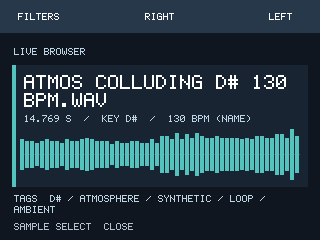
Open Live’s Browser and turn the encoder through its results. See available waveform, tags, key, duration and tempo metadata. Audition the result before committing it.
MPC SAMPLE FIRMWARE FOR ABLETON LIVE
Browse sounds, sequence drums, launch clips, and edit devices from the MPC Sample’s pads, knobs, fader and screen. Keep working in the Live Set you already have open.
Tested with Virtual MPC Sample · Live 12.4.16 · macOS
Physical MPC Sample qualification pending
Follow the beatmaking workflow tested with Virtual MPC Sample and Ableton Live 12.4.16 on macOS.
Turn the encoder through Live’s Browser results and audition a sound before loading it.
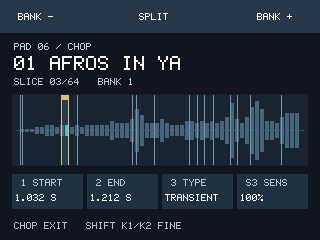
Adjust slice boundaries, then put the slices on pads in a new Live Drum Rack.
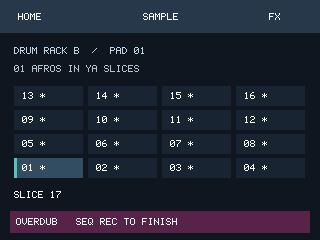
Record into a Live Session slot, loop the take, then add hits from another pad bank.
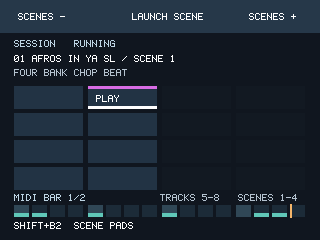
Launch the clip from the pad grid and follow its rhythm and playhead on the MPC screen.
These Virtual MPC Sample captures show the Live information each page puts under your hands.
SAMPLE SELECT · ENCODER
Open Live’s Browser and turn the encoder through its results. See available waveform, tags, key, duration and tempo metadata. Audition the result before committing it.
SAMPLE · PAD BANK
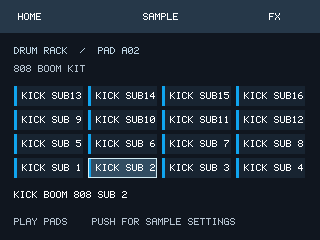
Load onto an empty pad or replace the sample on a supported Simpler pad while keeping its settings and effects. Press SAMPLE to return to your playable rack.
SHIFT + SAMPLE SELECT · ENCODER
Browse installed MPC expansions or folders of user-owned XPM drum programs. Import a supported kit onto a new Live track with its pad layout and samples. Native Live Drum Rack presets have their own source in the picker.
Verified examples include relocated samples, choke groups and a generated velocity-layer kit. Project and sequence import remain planned.
CHOP · K1–K3
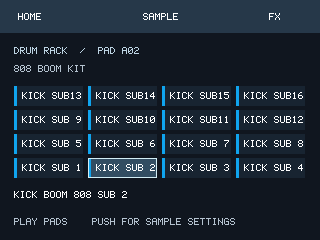
Audition slices, adjust boundaries on the waveform, and export to a new Drum Rack. Play the new kit across banks and keep the source sample intact.
SEQ · PADS
Use the 4×4 pad grid for clips and scenes. The screen follows the highlighted MIDI clip and shows its rhythm and playhead without taking the launch controls away.
SEQ REC · SEQ REC
Start a take in an armed Live Session slot. Press again to loop it. Overdub hits from another pad bank, then save the beat in your Live Set.
16 PADS · K1–K3
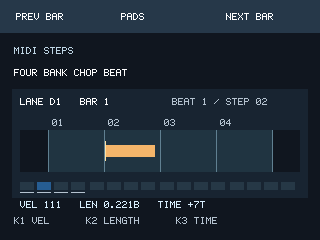
Use a pad per step. Hold a step and turn the knobs for velocity, length and timing. Zoom into a beat to see a nudge against the grid while the pads keep their step assignments.
TRACK MIXER · PAD MIXER
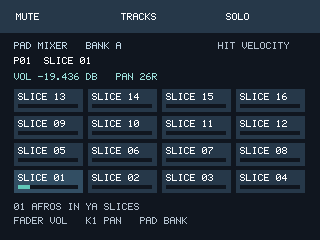
See track levels, or open the Drum Rack’s pad mixer for per-pad volume, pan, mute and solo. Pad meters respond to strikes and clip notes.
KNOB FX · ENCODER · FADER
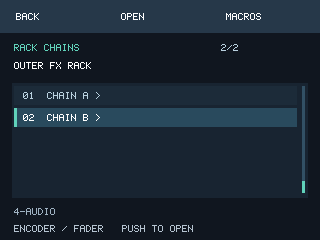
Turn the encoder or scrub with the fader. Push to open a rack, chain or effect. In settings, move between parameter banks and edit the three visible values with K1–K3.
ENCODER · K1–K3
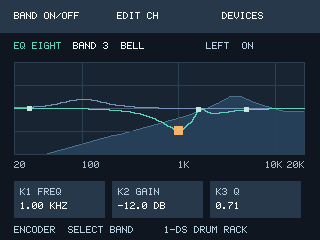
Select a band and adjust frequency, gain and Q. See the curve follow Live and enable the spectrum to see the signal after the selected EQ.
DRUM SYNTH · K1–K3
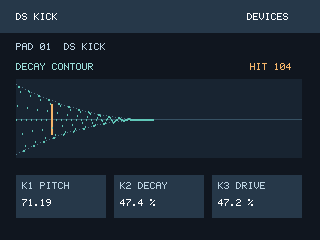
Open a Live Drum Synth to see its own hit graphic and decay. Play the sound from the pads and edit Live’s parameters on the same screen.
NOTE REPEAT · FADER
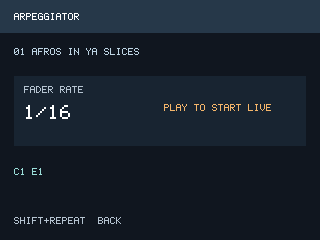
Repeat notes or hold a chord and arpeggiate it. Change rate with the fader and record the result in Live. Keyboard and Chord modes follow Live’s key and scale.
ARRANGEMENT · LOCATOR PADS
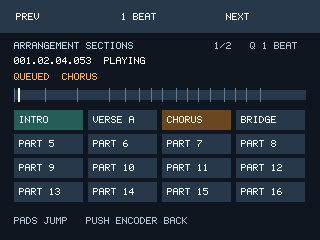
See Live’s locators on the MPC. Tap the corresponding pad to queue a jump on the beat during playback.
A 14-second before-and-after demo made from test captures of Virtual MPC Sample and Ableton Live 12.4.16 on macOS.
Open Events on the virtual MPC with a hit selected in a Live Session clip. Turn K3 to nudge the hit. The before-and-after captures show the edit in the MPC’s Events display and Live’s MIDI clip editor.
SampleTon is for MPC Sample owners who want to use their pads, knobs, fader and screen to work in an open Ableton Live Set. Live handles the audio, instruments, clips and saving.
Standalone MPC mods extend beatmaking on the unit itself. Project converters move existing beats into Live. Dedicated Live controllers use their own hardware. SampleTon gives the MPC Sample you already own a role inside the Set you’re working on.
PROTOTYPE STATUS · NOVEMBER 24, 2026
A working emulator prototype, with clear steps left before a hardware release.
Evidence comes from Virtual MPC Sample and Live 12.4.16 on macOS. Individual checks do not qualify every Set or preset.
Remaining checks include clip-editor copy and focus recovery across more Live workflows.
Windows support, track lock, deeper Collections integration, and MPC project and sequence import remain planned.
THE MPC ECOSYSTEM
Supported XPM drum programs become Live Drum Racks. Tested imports retain pad positions, relocated sample references, choke groups and disjoint velocity layers. The original MPC files stay intact.
The next library work is broader program fidelity, collection browsing, and project and sequence import. There is no promise that every MPC program or expansion will convert unchanged.
Explore the kit workflowLive handles audio, instruments, clips and saving. Your work stays in your Live Set.
The prototype starts from an SD card. Remove the controller card and reboot to return to stock. Physical hardware recovery is part of release testing.
The prototype imports supported, user-owned XPM drum programs from folders and installed expansions into a new Live Drum Rack. Tested examples include relocated audio and velocity layers. Overlapping layers, unsupported playback modes, and project or sequence import remain outside current support. See the kit workflow.
No. The tour shows prototype workflows. The status section separates tested Live examples from pending checks and planned work. Physical MPC Sample qualification is still required.
You need your own licensed Ableton Live installation and any devices or Packs used by your Set. SampleTon does not include Live, MPC software, factory content or third-party samples.
OPEN-SOURCE MPC SAMPLE FIRMWARE
Physical MPC Sample qualification is the next release milestone. Purchase will open when qualification, the offer and delivery are ready.